vPause - vk.com player hotkeys
vPause is a Chrome add-on developed by Spadar Shut that allows users to control the vk.com (vkontakte) audioplayer from any tab using hotkeys and a toolbar button. This free add-on provides convenient features to enhance the vk.com audio player experience.
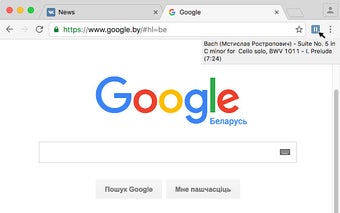
The main highlight of vPause is the addressbar button that enables users to easily play or pause the player with a single click. Additionally, users can configure a double-click action on the button to perform tasks like playing the previous or next track, toggling repeat, switching to the tab with the player, or adding the current song to their audio collection.
One of the key advantages of vPause is the ability to use hotkeys to switch tracks, play, pause, and control the volume. This allows users to effortlessly control their vk.com audio player without having to switch tabs or use the mouse.
Furthermore, vPause offers the option to display the track time on the button itself, providing users with quick access to this information. Additionally, hovering over the button will show a tooltip with the current track title and duration, allowing users to easily see what they are listening to.
Overall, vPause is a useful Chrome add-on for vk.com users who want to have convenient control over their audio player from any tab. With its customizable hotkeys and addressbar button, vPause enhances the user experience and makes managing and enjoying music on vk.com easier than ever.
[link]
[/link]